Understanding how to keep track of time worked is becoming increasingly important for construction companies striving to improve efficiency and accountability. Tracking how time is spent on-site has become a major concern across the industry as teams manage multiple projects and shifting schedules.
In fact, labor accounts for over 30% of total costs, so even minor errors in recording hours can disrupt project budgets[?].
Without an accurate time tracker for work, contractors risk misallocating resources and experiencing tighter profit margins.
The article explains how to improve cost control, productivity, and compliance in construction projects by tracking work time. It also provides key features and best practices to help you manage your projects more efficiently.
Importance of Construction Time Tracking
Accurate tracking of work time is central to managing costs, labor, and productivity in construction. The sections below explain how to keep track of time worked effectively and the main benefits of construction time tracking across payroll, efficiency, and profitability.
Accurate Payroll and Labor Costs
Work time tracking ensures every employee is paid correctly for hours worked and helps maintain compliance with labor regulations and
the UAE’s Wage Protection System (WPS). Time theft, such as "buddy punching," where one employee clocks in for another, is a common issue across industries.
The American Payroll Association (APA) reports that 75% of U.S. businesses are affected by time theft each year, resulting in an estimated $400 billion in productivity losses[?].
Accurate tracking of work time helps prevent these issues by eliminating payroll disputes,
avoiding overtime errors, and ensuring labor costs are aligned with the actual hours spent on-site.
Productivity and Project Management Efficiency
Consistent construction time tracking allows managers to compare planned versus actual hours and identify delays or bottlenecks before they affect delivery. With reliable data on how to keep track of time worked, teams can allocate resources more effectively, prevent burnout, and improve scheduling accuracy across projects.
Client Billing and Profitability
Accurate work time tracking improves
invoicing and
job costing by ensuring that every hour of labor is recorded and billed. Detailed tracking of work time also prevents scope creep, supports transparent client reporting, and protects profit margins through precise, data-driven billing.
How to Keep Track of Time Worked in Construction
Although there are several methods for tracking work time, each has its own pros and cons. In this section, we will delve into each of these aspects.
How to keep track of time worked
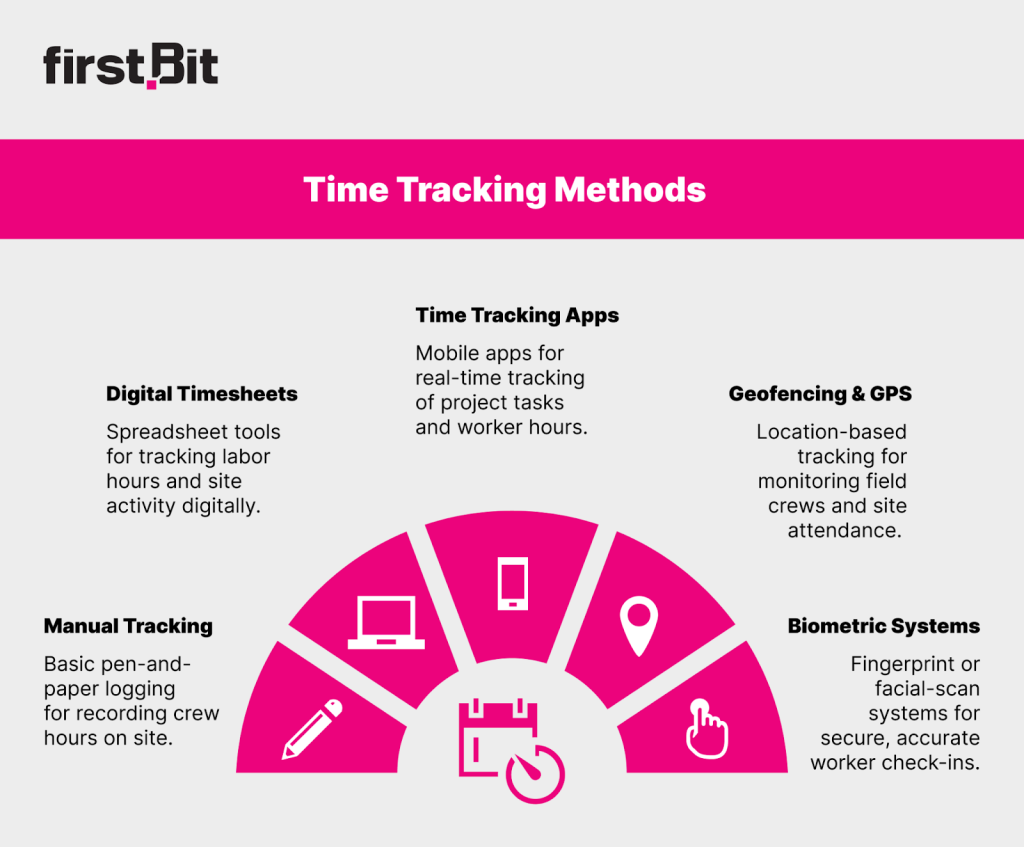
Manual Time Tracking
This method uses physical logs or notebooks to record employees’ working hours on site. Each worker or supervisor writes down start and end times, break durations, and total hours for the day. These records are later collected and entered manually into payroll or project reports.
Best for very small teams or short-term projects that need a basic way to record daily attendance and work hours.
Digital Timesheets and Spreadsheets
This method uses spreadsheet-based templates to log employee working hours electronically. Team members or supervisors enter start and end times, tasks, and total hours into shared digital sheets stored locally or in the cloud.
Best for small teams or startups that need a simple, affordable way to record and manage work hours digitally.
Work Time Tracking Software and Apps
This method uses specialized software or mobile applications to record work hours automatically and in real time. These tools often include features for task tracking, productivity monitoring, and integration with project management platforms. Data is synced across devices, allowing both field and office teams to log and review time from anywhere.
Pros
-
Comprehensive feature set
-
Integrates with project management systems
-
Provides real-time visibility and insights
Best for mid-sized and large teams that need automated, real-time tracking with advanced reporting and project integration.
GPS Tracking and Geofencing
This method uses GPS technology to record employees’ locations and working hours automatically. It is most effective for mobile and field-based construction teams that move between job sites.
Best for field service teams, remote crews, and contractors managing dispersed job sites.
Biometric Clock-in
This system verifies attendance using biometric identifiers such as fingerprints or facial recognition. It ensures precise tracking of work hours and prevents unauthorized or duplicate entries.
Best for large construction teams, secure work environments, or companies needing strict control over attendance and time accuracy.
Achieve peak productivity on site
Manage teams, equipment, and materials in FirstBit
Request a demo
Features to Look for in Construction Time Tracking Software
The right work time tracking software connects field activity with project goals, giving managers real-time visibility into attendance, labor costs, and performance across all sites.
Mobile App and Offline Access
Construction sites often operate in areas with weak or unstable internet. With mobile and offline access, employees can track work time directly from their phones, recording shifts, breaks, and job details even when offline.
Once a connection is restored, all records automatically sync with the central system. Supervisors can then review attendance by site or shift, ensuring accurate tracking of work time without relying on paper logs.
Job Costing
Job costing shows how much time and money each phase of a project requires. When workers clock in, they select their project and task from a simple dropdown list, such as electrical work, scaffolding, or finishing.
The work time tracker then calculates total labor hours and costs per project, comparing actual results with planned budgets. Managers can use the dashboard to identify which activities are exceeding time or cost targets.
Overtime and Break Calculations
Construction often involves long shifts and multiple crews. Automated overtime and break calculations ensure every schedule
complies with labor laws and company policy.
Once employees exceed daily or weekly thresholds, the time tracker for work flags those hours as overtime and applies the correct rate. It also alerts supervisors if mandatory rest periods are missed, helping maintain compliance and prevent payroll disputes.
Integration Capabilities
Effective construction time tracking depends on how well it integrates with payroll, HR, and project management modules. Once timesheets are approved, they flow directly into payroll, while employee data and project budgets update automatically. Such systems as
FirstBit ERP provide seamless connection, reduce administrative errors, and keep every department aligned on labor costs and productivity.
Real-Time Reporting and Analytics
Real-time dashboards in a time tracker for work help managers understand how to keep track of time worked across multiple sites. They can instantly see who is on-site, how many hours have been logged, and whether projects are within their labor budgets.
Reports can be filtered by project, department, or date to identify inefficiencies. These insights also improve forecasting for upcoming project stages, helping companies stay within schedule and cost.
Challenges and Solutions for Work Time Tracking in Construction
Introducing a new time tracking system in construction often reveals practical challenges. Field conditions, shifting schedules, and varying skill levels can make accurate hour tracking difficult, but recognizing these issues early helps ensure smooth adoption and reliable results.
Human Error in Manual Construction Time Tracking
Paper logs and spreadsheets often lead to incomplete or inaccurate data. Hours may be recorded incorrectly, documents misplaced, or even altered after submission, resulting in payroll errors and compliance issues.
Solution
Replace manual logs with digital work time tracking software that records entries automatically and stores them in a secure cloud database. Automated clock-ins, location-based check-ins, and real-time synchronization eliminate transcription mistakes and reduce missing data. Supervisors can review and approve timesheets instantly, ensuring payroll accuracy and consistent reporting.
Resistance to Change
Workers sometimes view a work time tracker as excessive oversight. This perception is common among crews used to traditional paper-based tracking or informal reporting.
Solution
Communicate the purpose clearly — to ensure fair pay, improve scheduling, and reduce administrative delays. Give employees visibility into their own logged hours so they can review, confirm, or correct entries before approval. Brief training sessions and open discussions during rollout can help build trust and show how tracking protects both workers and management.
Compliance Issues
Missed overtime records, skipped breaks, or inconsistent logs can cause violations of labor law or WPS regulations in the UAE. Noncompliance can lead to fines, payment delays, or legal complications.
Solution
Implement work time tracking software that automatically calculates overtime, flags missing breaks, and integrates with payroll and HR systems. Automated compliance alerts allow managers to correct issues immediately.
Integration with Project Budgets and Job Costing
When labor hours are recorded separately from project budgets, managers lose insight into how time impacts cost performance. Without this link, it becomes difficult to assess profitability or identify overspending in specific project phases.
Solution
Connect your construction time tracking system with job costing and budget management tools. Each logged hour should automatically update project costs and progress dashboards. Managers can monitor labor expenses by activity, compare real-time spending with estimates, and adjust team allocations to keep projects within budget.
Technology Adoption and Training
Not all field workers are confident using digital platforms for how to keep track of time worked. Limited digital literacy can slow adoption and create inconsistent data.
Solution
Launch the system with a small pilot team and gather feedback before a full rollout. Provide short, on-site training that walks workers through clock-ins, task selection, and syncing data. Choose software with a simple, mobile-friendly interface that mirrors daily workflows. Continuous support through team leads or help channels ensures long-term adoption and data consistency.
Stay ahead of delays
Request a demo
How FirstBit ERP Simplifies Tracking of Work Time for Construction Projects
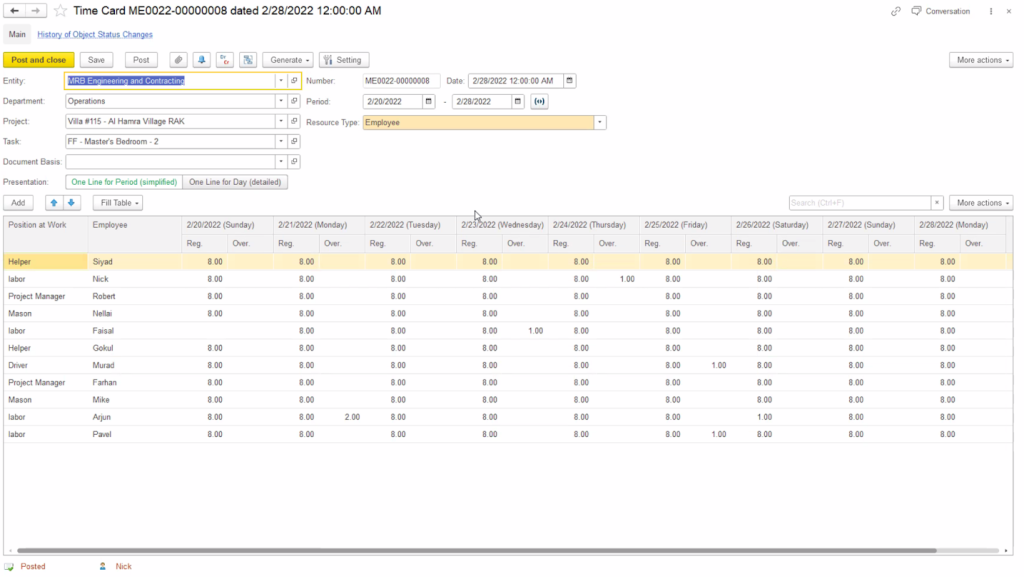
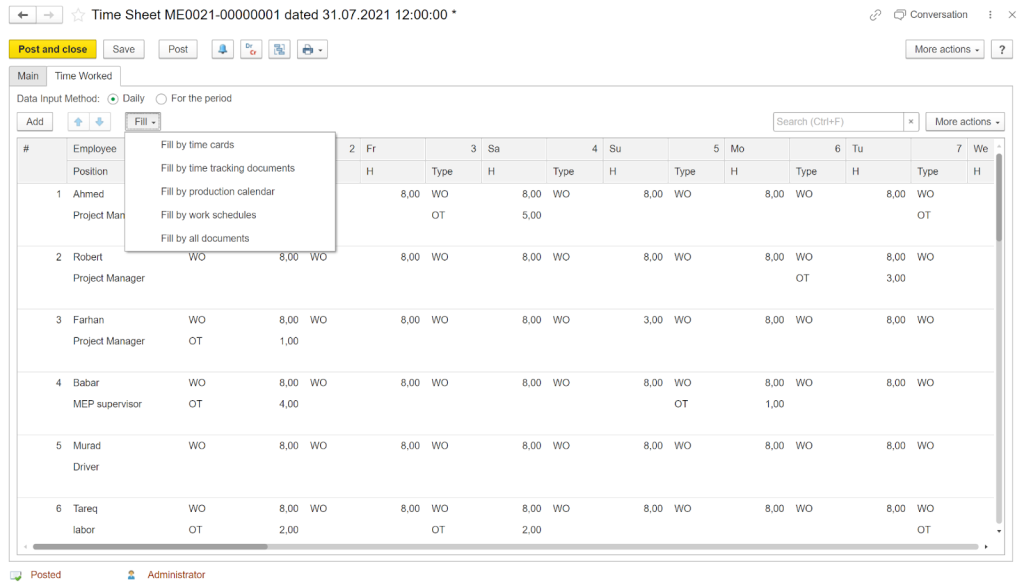
FirstBit ERP makes construction time tracking simpler by connecting attendance, scheduling, and payroll into one platform. All working hours such as regular, overtime, and job-based are collected from digital time cards or site attendance logs and automatically linked to payroll processing, ensuring consistency across every project.
Time card in FirstBit ERP
Users can track work time in several ways: manually, through project resource allocation, or by importing Excel-based timesheets. This flexibility helps both small and large construction teams manage records efficiently, regardless of site size or connectivity conditions.
Time sheet in FirstBit ERP
In the HR & Payroll module, the Calculation Parameters section gives a clear overview of how time data is used for payroll and reporting. It includes parameters like Hours Worked, Days Worked, Overtime Hours, Absence Days, Tariff, and Norm Hours.
Each field defines how a specific time category impacts wage calculation or job cost allocation, allowing companies to maintain complete transparency in how they track work time.
Calculation parameters tab in FirstBit ERP
This structure ensures that work time tracking data flows directly into payroll and project cost reports, minimizing manual input and reducing errors. Project managers can instantly review attendance, confirm accuracy, and align labor hours with project budgets — all within a single, connected system.
F.A.Q.
Why should I track work time if I already use timesheets or time cards?
Although time cards help you avoid overpaying, work time tracking in FirstBit ERP helps you optimize performance. It links hours to specific tasks, cost codes, and project milestones, so you can see how effectively hours were used, not just how many were worked. This leads to smarter decisions and greater accountability.
How does work time tracking increase accountability among workers and subcontractors?
When every hour is tied to a specific task or cost code, it’s clear who did what and how long it took. Workers know their time is visible to project managers, which discourages “buddy punching” and fosters a sense of ownership. Subcontractors can be billed or evaluated based on verified hours, not estimates.
Can I use this for multiple projects or sites simultaneously?
Yes. FirstBit lets you track, compare, and manage labor time across unlimited projects and locations from a single dashboard. See which sites are running efficiently, which crews are the most productive, and where resources should be reallocated — all in real time.
How quickly can I start seeing results after implementation?
Many clients experience increased labor efficiency and clearer accountability within the first 30 days. Real-time dashboards and automated reports give managers immediate visibility, and teams quickly adapt to the new culture of transparency and performance.
Keep your project on track
Manage every phase efficiently with ERP tools
Request a demo
Anna Fischer
Construction Content Writer
Anna has background in IT companies and has written numerous articles on technology topics.













'%3e%3cg%20clip-path='url(%23clip1_6548_6055)'%3e%3cpath%20d='M13.974%2015.6195C14.2724%2016.0185%2014.6532%2016.3487%2015.0905%2016.5876C15.5278%2016.8265%2016.0114%2016.9686%2016.5084%2017.0042C17.0055%2017.0398%2017.5043%2016.9681%2017.9712%2016.7939C18.4381%2016.6198%2018.8621%2016.3472%2019.2143%2015.9948L21.2994%2013.9098C21.9324%2013.2544%2022.2827%2012.3766%2022.2747%2011.4654C22.2668%2010.5543%2021.9014%209.68269%2021.257%209.03839C20.6127%208.39408%2019.7412%208.02862%2018.83%208.0207C17.9189%208.01278%2017.0411%208.36305%2016.3857%208.99606L15.1902%2010.1845M16.754%2014.2295C16.4555%2013.8305%2016.0747%2013.5003%2015.6374%2013.2614C15.2002%2013.0225%2014.7166%2012.8804%2014.2196%2012.8448C13.7225%2012.8092%2013.2237%2012.8809%2012.7568%2013.0551C12.2899%2013.2292%2011.8659%2013.5018%2011.5136%2013.8542L9.42861%2015.9392C8.7956%2016.5946%208.44534%2017.4724%208.45326%2018.3836C8.46117%2019.2947%208.82664%2020.1663%209.47094%2020.8106C10.1152%2021.4549%2010.9868%2021.8204%2011.898%2021.8283C12.8091%2021.8362%2013.6869%2021.4859%2014.3423%2020.8529L15.5308%2019.6645'%20stroke='%235F7896'%20stroke-width='1.39002'%20stroke-linecap='round'%20stroke-linejoin='round'/%3e%3c/g%3e%3c/g%3e%3crect%20x='0.438953'%20y='0.438953'%20width='28.9709'%20height='28.9709'%20rx='14.4855'%20stroke='%235F7896'%20stroke-width='0.877907'/%3e%3cdefs%3e%3cclipPath%20id='clip0_6548_6055'%3e%3crect%20width='29.8488'%20height='29.8488'%20rx='14.9244'%20fill='white'/%3e%3c/clipPath%3e%3cclipPath%20id='clip1_6548_6055'%3e%3crect%20width='16.6802'%20height='16.6802'%20fill='white'%20transform='translate(7.02344%206.58435)'/%3e%3c/clipPath%3e%3c/defs%3e%3c/svg%3e)