





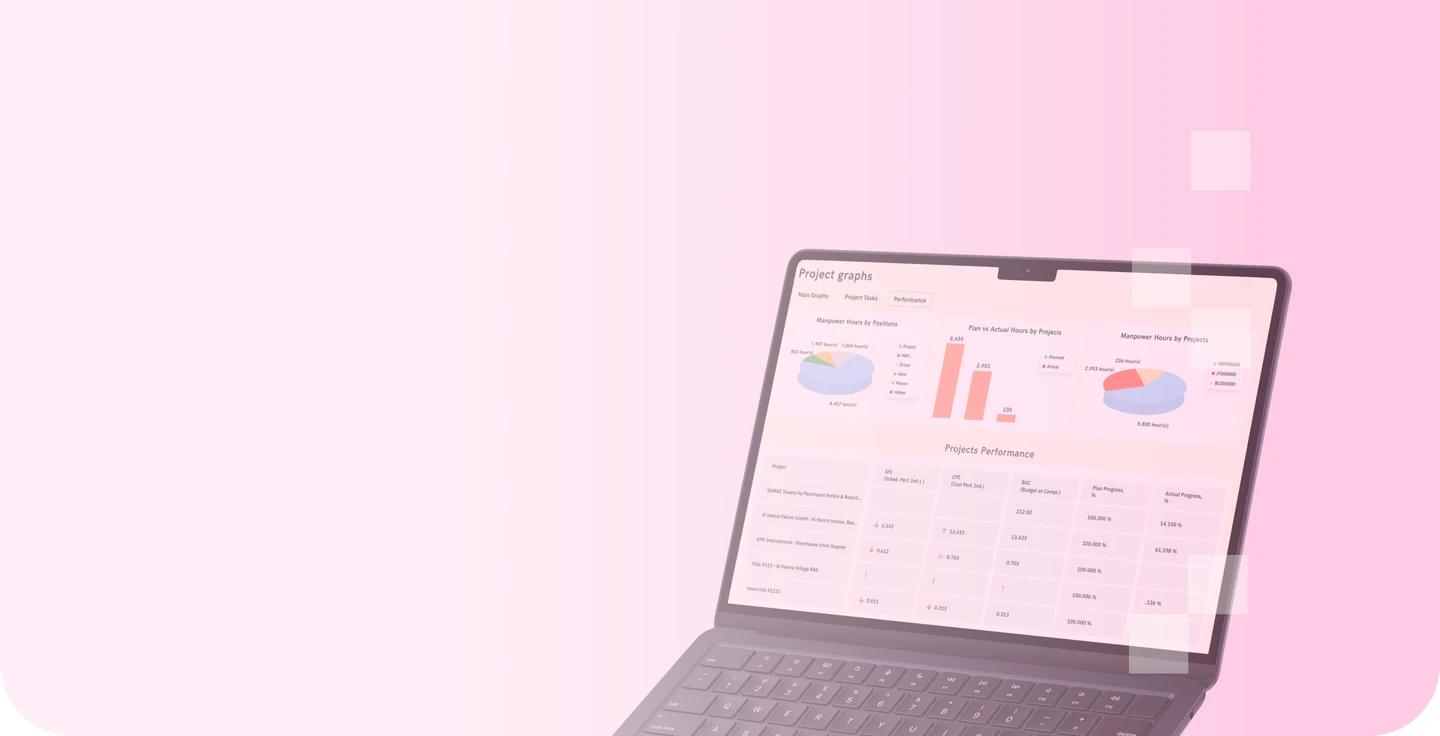

Project management
CONSTRUCTION PROJECT MANAGEMENT SOFTWARE
Get full control of construction projects
Master project budgeting with precise estimating and real-time cost control tools. Connect WBS and BOQ, track costs by BOQ line item, manage change orders, and forecast cash flow by project — all in one system.
Replace spreadsheets and reduce profit leakage with a ready-made construction ERP module for project cost control, built specifically for contractors in the UAE.
Replace spreadsheets and reduce profit leakage with a ready-made construction ERP module for project cost control, built specifically for contractors in the UAE.
Request a demo

Trusted by 120+ UAE contractors managing 500+ active projects

















TRACK
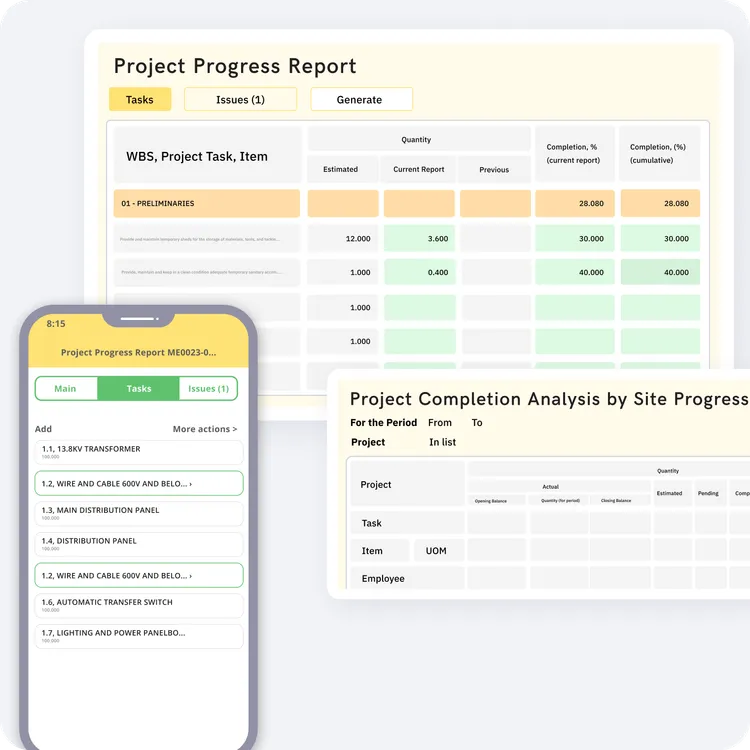
Track construction project progress by BOQ & milestones
-
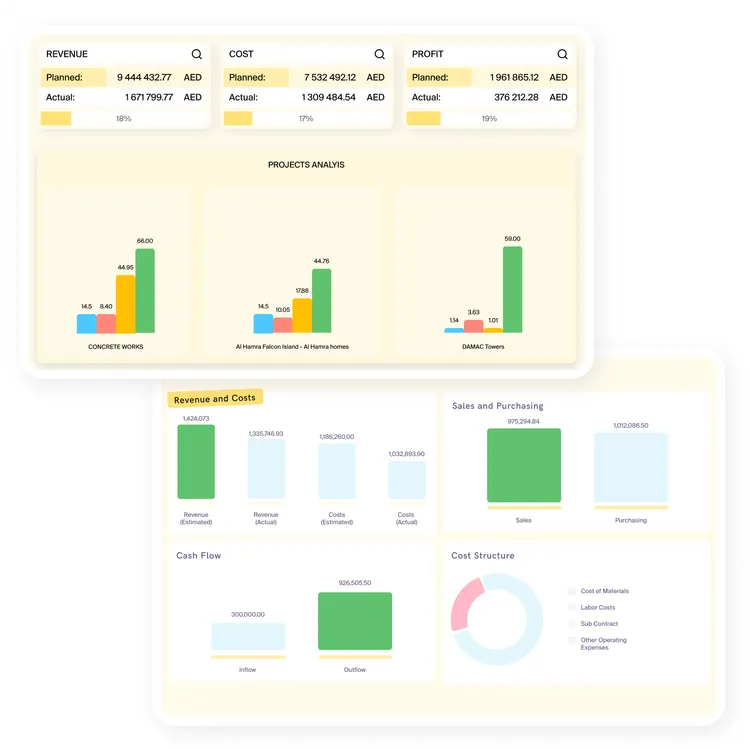
 Get a centralized view of project status, milestones, cost performance, and key metrics in one construction project management dashboard
-
Track progress by BOQ line, task, activity, or project phase with daily, weekly, and monthly progress reports
-
Attach site photos, field updates, and incident notes directly from the mobile app
-
Compare estimations and budgets against actual performance to identify delays and gaps early
Request a demo

STAY IN SYNC
Manage project budgets and invoicing in real time
-
Manage your budget, monitor quotes, purchases, expenses, invoices, payments, and payables — all within one system
-
Link purchases to project budgets and receive real-time billing status updates tailored to the needs of the construction industry
-
Use autogenerated project progress reports for milestone or progress invoicing, based on payment applications or proforma invoices
-
Give project and finance teams one shared view of project costs and billing status
Request a demo

ALLOCATE
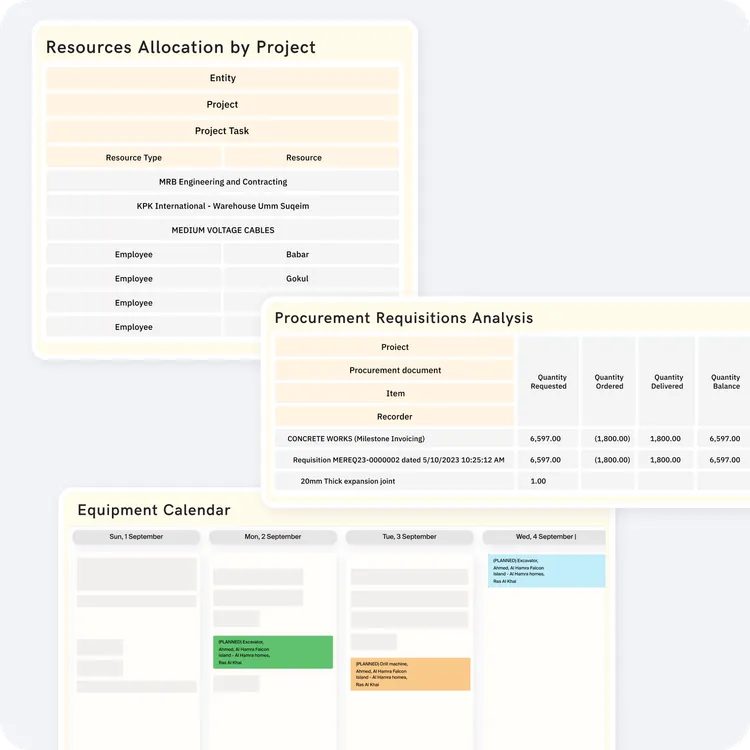
Optimize allocation of resources across multiple sites
-
Assign manpower, equipment, and materials based on project timelines, priorities, and site requirements
-
Track real-time resource availability across multiple projects to reduce downtime, clashes, and delays
-
Allocate labor by role or skill set and connect attendance and time cards to project planning and cost tracking
-
Compare planned versus actual resource utilization to improve site productivity
Request a demo

ORGANIZE
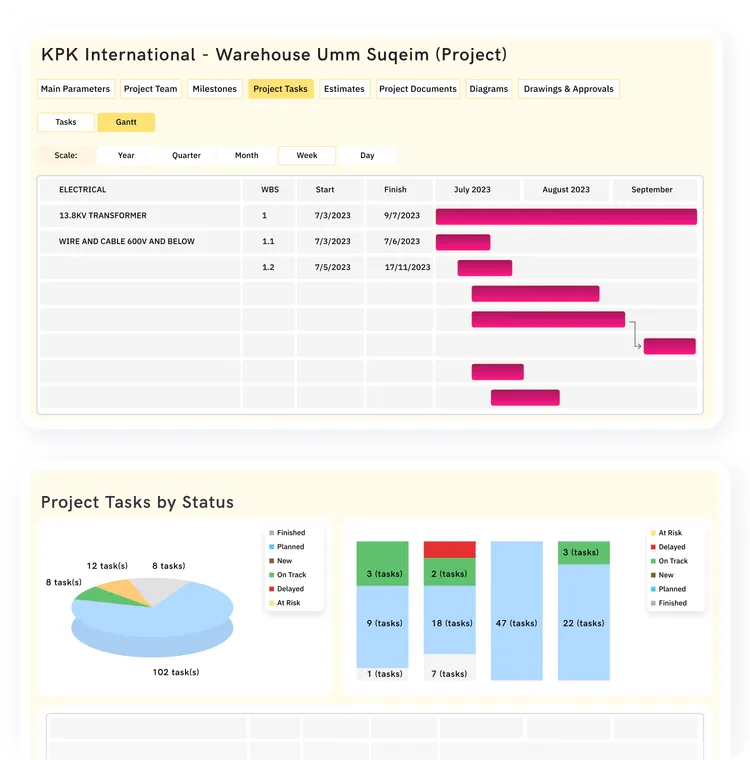
Keep construction schedules on track with integrated planning
-
Organize projects and tasks in one structured pipeline for better scheduling control
-
Track milestones, deadlines, and task completion against baseline project plans
-
Assign, prioritize, and monitor tasks across projects
-
Identify schedule slippage early and act faster using centralized project management software for construction companies
-
Boost team productivity and reduce miscommunication
Request a demo

COLLABORATE
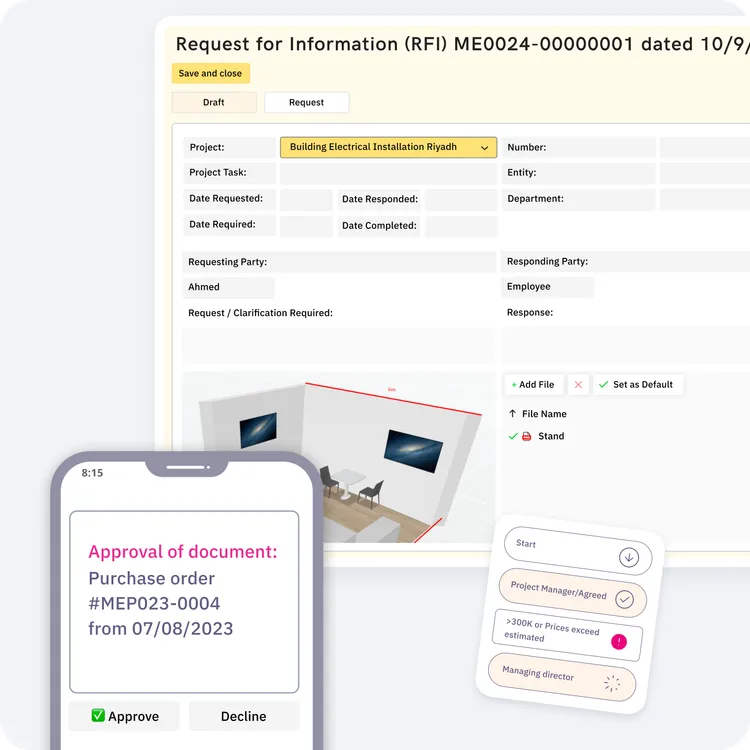
Streamline approvals and RFI management
-
Configure approval workflows for budgets, requisitions, estimates, time cards, and other project-related documents
-
Submit, track, and resolve RFIs in one construction project management tool with full history and document context
-
Attach files, notes, and supporting information to keep every request and decision easy to review later
-
Use automated notifications and a clear audit trail to improve accountability across teams, suppliers, and subcontractors
Request a demo

Core construction project management tools in FirstBit ERP
From MEP companies to general contractors in Dubai, businesses are turning to FirstBit ERP to streamline operations. These tools eliminate reliance on spreadsheets, cut reporting time by 50%, and enable a 20% cost reduction.

Project dashboard
Get a real-time overview of all active projects, including cost, progress, tasks, and key performance indicators in one dashboard.
'%3e%3cpath%20d='M17.1133%2024.1832V10.041M17.1133%2010.041L10.0422%2017.1121M17.1133%2010.041L24.1843%2017.1121'%20stroke='white'%20stroke-width='2'%20stroke-linecap='round'%20stroke-linejoin='round'/%3e%3c/g%3e%3cdefs%3e%3cclipPath%20id='clip0_2767_4864'%3e%3crect%20width='24'%20height='24'%20fill='white'%20transform='translate(17.1133%200.141602)%20rotate(45)'/%3e%3c/clipPath%3e%3c/defs%3e%3c/svg%3e)


Cash flow by project
Monitor planned and actual cash inflows and outflows by project to improve forecasting and financial control.


RFIs
Manage and resolve project queries in one system and keep all responses, files, and communication history easy to trace.


Tasks pipeline
Schedule, prioritize, and monitor tasks across multiple projects, ensuring timely completion and balanced workloads.


Project costs analysis
Analyze project expenses by category, activity, task, or cost item.


Project progress report
Track progress by milestone, task, and BOQ line with detailed reports that show where each project stands.


Gantt chart
Visualize timelines, dependencies, and schedule changes in one interactive view to keep projects on track.


Project damages and losses
Record and analyze unexpected damages and losses by project to improve accountability and recovery planning.


Electronic approvals
Approve requisitions, purchase orders, estimates, budget changes, and time cards faster with structured digital workflows.


Reporting
Generate project overviews, cost reports, financial summaries, and stakeholder-ready reports from one system.


Time cards
Capture labor and equipment hours from site teams for better payroll accuracy, utilization tracking, and project costing.


Requisitions
Create and manage material and resource requests with a direct link to project budgets and purchasing workflows.


Resource planning
Plan and allocate labor, equipment, and materials across projects to reduce downtime and improve productivity.


Subcontractor report
Track subcontractor progress, costs, and performance in one place to improve control over outsourced work.
See how contractors use First Bit project management tools in practice
See how construction companies use FirstBit ERP to improve project visibility, cost control, and coordination between site and office.Who can benefit from the First Bit project management module
Ideal for UAE general and specialty contractors with 100+ employees managing building,
fit-out, MEP, and specialized projects.
fit-out, MEP, and specialized projects.







See FirstBit ERP solutions in action
Discover how our system solves the unique challenges of contractors in a personalized demo.
After the demo you will get a quotation for your company.
After the demo you will get a quotation for your company.
Frequently asked questions
Don't find an answer? Meet our expert to get a detailed quote.
Contact us
What does construction project management software help contractors control?

Construction project management software helps contractors track progress, project costs, tasks, RFIs, approvals, labor, materials, and subcontractors in one system.
In FirstBit ERP, the project management module is connected with cost control, procurement, payroll, and reporting, which improves visibility across both site and office.
Does FirstBit ERP support cloud-based and mobile access for project teams?

Can FirstBit ERP track progress by BOQ line and project milestone?
Can FirstBit ERP import project BOQs and create estimations?
Can the project management module help control project costs?
How does FirstBit ERP support multi-level approvals and RFIs?
Can FirstBit ERP help allocate labor, equipment, and materials across multiple projects?
What reports can project managers generate in FirstBit ERP?
What construction project management tools are included in FirstBit ERP?
Can we add project templates to FirstBit ERP?
How can I track my team's attendance and task completion using a commercial construction project management software?
How does the FirstBit ERP help with project scheduling and planning?
Don't find an answer? Meet our expert to get a detailed quote.
Contact us