





BOQ vs BOM: What’s the Difference (and Why Contractors Keep Confusing Them)
Publication date 02 Sep 2026 •
Updated 18 Sep 2026 •
7 min read

Anna Fischer
Construction Content Writer


A UAE contractor wins a tender from a priced bill of quantities. Procurement then builds requests from a separate material spreadsheet. Two months later, what was ordered does not match the work measured for payment. The problem is rarely one careless employee. It starts when documents with different purposes are managed as one file.
Using construction ERP software can connect commercial planning, purchasing, inventory, and project control. First, every team must understand why contractors keep confusing the two documents, what each controls, and how they should move through one process.
What’s the difference between BOQ and BOM?
A BOQ tells you how much work will be executed and what it will cost. A BOM tells you which materials, components, and assemblies are needed to execute that work. The first is commercial and often contractual. The second is material-focused and operational.
The distinction appears on three levels. Purpose: the commercial schedule supports cost estimation, tendering, valuation, and payments, while the material list drives procurement, ordering, fabrication, and inventory. Content: one contains measured items of work with units, quantities, rates, and amounts; the other contains specific physical inputs and part details. Timing: one is usually established before contract award, while the other is refined for execution and pre-ordering.
What is a bill of quantities?
A BOQ, or bill of quantities, organizes pricing by breaking a project into quantifiable elements. Each line normally describes an item of work and gives its unit, quantity, rate, and total amount. It is prepared from drawings and specifications under the project’s accepted method of measurement.
The document may include preliminaries and work items whose rates cover materials, equipment, labor expenses, overheads, and margin. It gives tenderers a common pricing structure, supports bid comparison, and can become part of the contract. During execution, it also supports interim payments, cost control, and the valuation of variations. It is the financial plan for work executed, not a shopping list.
In practice, the challenge is keeping this commercial structure connected to actual project performance and cost planning. ERP systems for construction can help by linking BOQ lines with project estimates, cost components, and actual project data, so commercial teams can compare expected revenue with the resources required to deliver the work.
FirstBit ERP brings these controls into one project environment, where contractors can import BOQ data, structure revenue and costs by project task, and track how individual cost elements contribute to the overall estimate.

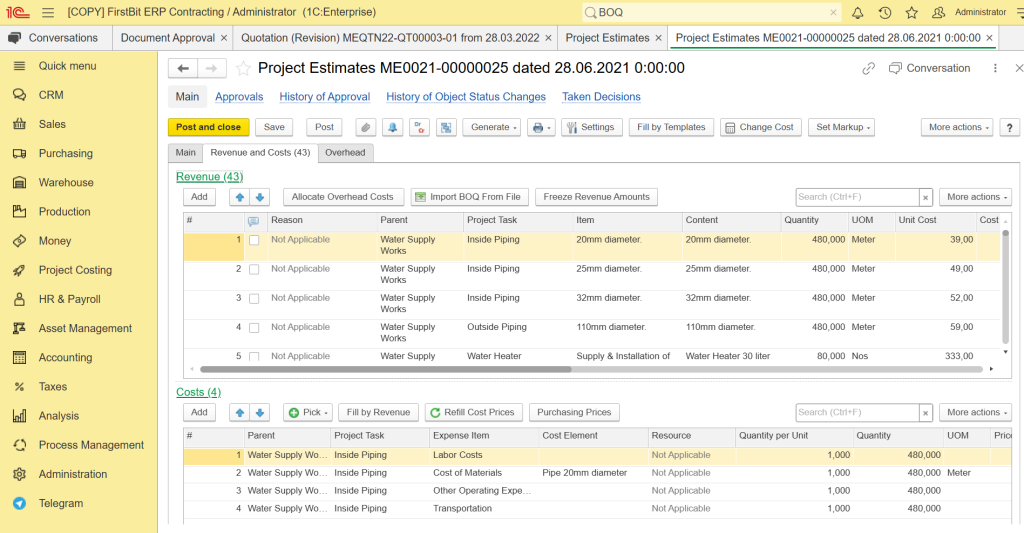
BOQ-based project estimation in FirstBit ERP, with revenue and cost breakdown by project task
Reduce costs and avoid shortages
Optimize procurement with FirstBit ERP
Request a demo
What is a bill of materials?
A BOM, or bill of materials, is a structured list of what must physically be purchased or produced. It records materials, components, subassemblies, quantities, specifications, and often item or part numbers. A multi-level version can show how smaller components belong to a larger fabricated assembly.
This document supports procurement, manufacturing, fabrication, delivery planning, and warehouse control. It is usually more specific than a commercial work item. In practical terms, it works like a detailed shopping list for the things that need to arrive on site. Labor and general overheads are usually excluded because the list focuses primarily on physical inputs.
The operational challenge appears when material requirements are managed separately from project budgets, purchasing, and available stock. Construction ERP systems can connect material demand with requisitions, purchase orders, approvals, warehouse receipts, and project inventory, giving procurement teams a clearer view of what is required, committed, received, and already available.
This is the type of workflow supported in FirstBit ERP, where these processes are connected within the project environment, helping teams check demand and stock before additional purchases are approved and assign material costs to the relevant project structure.
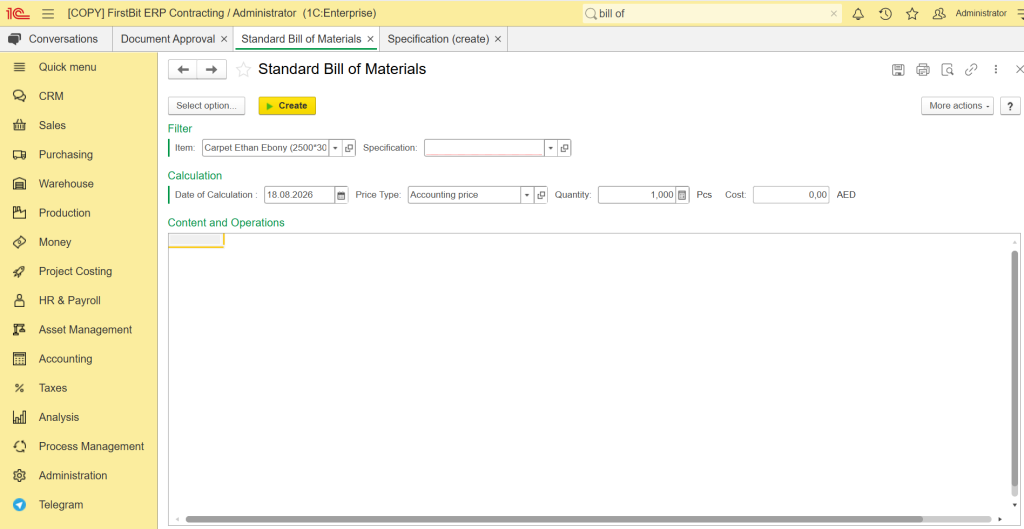
Managing BOM components, specifications and costs in FirstBit ERP
BOQ vs BOM: key differences at a glance
| Parameter | BOQ | BOM |
| Main question | How much work, and at what cost? | What materials are needed? |
| Primary purpose | Estimating, tendering, valuation | Procurement, ordering, inventory |
| Typical content | Work items, units, quantities, rates | Materials, components, part numbers |
| Labor and overheads | Usually included inside rates | Usually excluded |
| Main project stage | Pre-contract and contract administration | Execution and pre-ordering |
| Status | Commercial, often contractual | Operational |
| Usually prepared by | Quantity surveyor or estimator | Engineering or procurement team |
| What it drives | Payments, variations, cost control | Purchase orders, deliveries, stock |
The table shows why these terms cannot be synonyms. One describes priced scope; the other translates technical needs into supply actions. Contractors need both views to understand what has been earned and what must still be bought.
Align every purchase with project goals
Request a demo
How both documents work together on a construction project
They do not compete. They form one chain from design to payment: Drawings and specifications → material takeoff → priced work schedule → contract → detailed material list by work package → purchase requisitions → purchase orders → deliveries and warehouse issues → progress valuation.
A material takeoff, or MTO, measures materials from drawings. Those quantities feed pricing and later support the detailed list used for purchasing. This middle step explains much of the confusion: the same measured material can appear in both records, but it supports different decisions.
Each requisition and purchase order should be linked to a priced work line, WBS element, or cost code. Without that link, management cannot compare the cost of resources consumed with the value of work completed.
What happens when they do not match, and how FirstBit ERP helps
When commercial scope and material demand are disconnected, over-ordering can create waste or idle stock, while under-ordering can delay site work. Teams may also struggle to support completed quantities, explain variations, or assign supplier costs correctly. The result is distorted project P&L, unreliable cash-flow forecasts, and cost overruns that become visible too late.
FirstBit ERP supports construction and contracting companies in the UAE. The system provides line-item estimates and project budgets, cost allocation by project, actual-versus-budget analysis, project P&L, cash-flow planning, and progress tracking by line item. It also connects requisitions, purchase orders, supplier workflows, approvals, project inventory, warehouse balances, and financial records in one environment.
This structure helps keep commercial and operational data aligned. Project teams can see how approved purchases affect the budget, finance can assign actual costs to the correct project structure, and management can review progress, costs, inventory, and profitability through dashboards and consolidated reporting.
Ensure materials arrive right on time
Track orders with FirstBit ERP
Request a demo
FAQ
Can a material list replace a priced work schedule?
Who usually prepares each document?
Is a material takeoff the same as a bill of materials?
Do small contractors need both documents?
Conclusion: two documents, one cost picture
The difference between BOQ and BOM is not academic. It separates the commercial view of work and money from the operational view of materials and supply. A contractor protects margin earlier when every request, order, delivery, and cost is linked to the work item that earns revenue.
Together, connected budgeting, procurement, inventory, approvals, and reporting create a clearer project cost picture. Explore how FirstBit ERP construction software can support your specific business needs.
Get top-quality materials at the best prices for your construction project
Request a demo

Anna Fischer
Construction Content Writer
Share this article
'%3e%3cg%20clip-path='url(%23clip1_6548_6055)'%3e%3cpath%20d='M13.974%2015.6195C14.2724%2016.0185%2014.6532%2016.3487%2015.0905%2016.5876C15.5278%2016.8265%2016.0114%2016.9686%2016.5084%2017.0042C17.0055%2017.0398%2017.5043%2016.9681%2017.9712%2016.7939C18.4381%2016.6198%2018.8621%2016.3472%2019.2143%2015.9948L21.2994%2013.9098C21.9324%2013.2544%2022.2827%2012.3766%2022.2747%2011.4654C22.2668%2010.5543%2021.9014%209.68269%2021.257%209.03839C20.6127%208.39408%2019.7412%208.02862%2018.83%208.0207C17.9189%208.01278%2017.0411%208.36305%2016.3857%208.99606L15.1902%2010.1845M16.754%2014.2295C16.4555%2013.8305%2016.0747%2013.5003%2015.6374%2013.2614C15.2002%2013.0225%2014.7166%2012.8804%2014.2196%2012.8448C13.7225%2012.8092%2013.2237%2012.8809%2012.7568%2013.0551C12.2899%2013.2292%2011.8659%2013.5018%2011.5136%2013.8542L9.42861%2015.9392C8.7956%2016.5946%208.44534%2017.4724%208.45326%2018.3836C8.46117%2019.2947%208.82664%2020.1663%209.47094%2020.8106C10.1152%2021.4549%2010.9868%2021.8204%2011.898%2021.8283C12.8091%2021.8362%2013.6869%2021.4859%2014.3423%2020.8529L15.5308%2019.6645'%20stroke='%235F7896'%20stroke-width='1.39002'%20stroke-linecap='round'%20stroke-linejoin='round'/%3e%3c/g%3e%3c/g%3e%3crect%20x='0.438953'%20y='0.438953'%20width='28.9709'%20height='28.9709'%20rx='14.4855'%20stroke='%235F7896'%20stroke-width='0.877907'/%3e%3cdefs%3e%3cclipPath%20id='clip0_6548_6055'%3e%3crect%20width='29.8488'%20height='29.8488'%20rx='14.9244'%20fill='white'/%3e%3c/clipPath%3e%3cclipPath%20id='clip1_6548_6055'%3e%3crect%20width='16.6802'%20height='16.6802'%20fill='white'%20transform='translate(7.02344%206.58435)'/%3e%3c/clipPath%3e%3c/defs%3e%3c/svg%3e)


Related articles


See all








See FirstBit ERP solutions in action
Discover how our system solves the unique challenges of contractors in a personalized demo.
After the demo you will get a quotation for your company.
After the demo you will get a quotation for your company.