Even a profitable construction project can create cash pressure when payments arrive late. UAE contractors often need to pay for materials,
payroll, subcontractors, and suppliers before client approvals, progress claims, and invoice payments are completed.
When finance teams rely on spreadsheets and delayed project updates, payment risks become visible too late. AI for construction finance can help contractors forecast cash gaps earlier by analyzing project, billing, payment, and cost data within a unified system.
In this article, we explain how AI in construction cash flow helps UAE contractors predict payment delays, prevent cash shortages, and improve visibility when the right data foundation is in place.
AI in Construction Cash Flow Management
AI in construction cash flow management helps contractors improve the workflows that control incoming payments, outgoing payments, and timing. In construction, this matters because finance teams depend on data from projects, procurement, suppliers, clients, and site teams. AI can reduce manual work in these processes and help teams react earlier to cash flow risks.
Benefits
For construction finance teams, the main value of AI for construction finance is better control over routine processes that directly affect cash position. Instead of waiting for manual updates from different departments, teams can use AI-supported workflows to process data faster and make decisions with fewer blind spots.
AI can help contractors:
-
Reduce manual work in AP and AR
-
Speed up approvals for costs and billings
-
Improve accuracy of invoice and cost data
-
See cash commitments earlier
-
React faster to payment, cost, or project risks
These benefits help finance teams keep cash flow more predictable, avoid late reactions, and spend less time reconciling information across spreadsheets and disconnected systems.
Use Cases of AI in Construction Cash Flow
In practice, AI tools for construction cash flow are most useful where cash flow depends on repetitive data checks, document processing, and early risk signals. These are areas where construction companies often lose time because invoices, purchase orders, project costs, and billing data sit in different systems or files.
Common use cases include:
-
Reading invoice PDFs with computer vision
-
Matching invoices with purchase orders
-
Allocating costs by job number or vendor
-
Predicting material and resource needs
-
Supporting WIP and billing forecasts
-
Flagging budget or schedule risks that may affect cash flow
Together, these use cases help contractors connect financial activity with
project progress, so teams can identify cash pressure earlier and reduce delays caused by missing or inaccurate data.
AI in Construction Cash Flow Forecasting
Construction cash flow forecasting is difficult because contractors often pay for labor, materials, and subcontractors before client payments arrive. AI in construction cash flow forecasting helps finance teams project inflows and outflows, identify possible cash gaps in advance, and adjust actions before a project is under pressure.
How AI Forecasting Differs From Traditional Cash Flow Forecasting
Traditional forecasting often depends on spreadsheets, periodic updates, and manual reconciliation between project, finance, and scheduling systems. This makes the forecast vulnerable when subcontractors fall behind, material costs change, or client approvals are delayed. AI forecasting uses live project and financial data to update projections more frequently and flag cash gaps before they become urgent.
Research on AI-driven cash flow forecasting in ERP systems shows that models can become more responsive when they combine real-time transaction data with external indicators such as inflation, interest rates, commodity prices, and geopolitical sentiment. In one ERP-focused study, simulations and case studies showed up to a 30% increase in forecast accuracy when AI models were integrated with ERP and economic data[?].
Core Technologies Behind AI Forecasting
AI forecasting depends on several building blocks: clean project data, historical payment behavior, real-time cost updates, invoice data, and external factors such as material prices or interest rates. Research on cash flow forecasting shows that AI models work better when they use both internal financial records and wider market indicators, rather than relying only on static historical data.
In practice, this means contractors need to prepare the right data before expecting accurate forecasts:
-
Project budgets and actual costs
-
Client payment history
-
Supplier and subcontractor commitments
-
Approved invoices and pending payments
-
Project progress and billing milestones
-
Market factors that affect costs or payment timing
A research paper on AI-based cash flow forecasting tested forecasting models on a dataset of 130,000 prepared data points, including sales records, expense reports, cash flow statements, economic indicators, and customer payment behavior.
The study found that advanced AI models reduced forecasting error compared with a traditional time-series model: the error rate was 5.5% for the traditional model and 4.2%, 4.0%, and 3.8% for the AI-based models. For contractors, the takeaway is practical: forecast accuracy depends not only on the algorithm, but also on how well the company collects, cleans, and connects financial and operational data[?].
Manage your cash flow with confidence
Request a demo
Best Practices for Implementing AI for Construction Finance
Before choosing AI tools for construction cash flow, contractors should decide where automation can create the fastest impact: invoice approvals, payment tracking, billing, cost updates, or cash flow forecasting. This helps avoid adding disconnected tools before the company has clear workflows and reliable data.
1. Start With High-Impact Workflows
The first AI use cases should be tied to finance processes where delays or errors directly affect cash flow. For most contractors, this means accounts payable, accounts receivable, invoicing, payroll inputs, procurement delays, and cash flow forecasting.
Start with workflows that already create pressure for the finance team:
When AI is applied to these areas first, the impact is easier to measure because the results are linked to faster billing, fewer errors, and better visibility over upcoming payments.
Pro tip
Choose one workflow, such as invoice matching or cash flow forecasting, and document the current process step by step. Track how long it takes, how many people are involved, where data is re-entered, and where delays happen. Use this baseline to measure AI impact after implementation.
2. Build a Unified Data Environment
AI cannot deliver useful insights if project, finance, procurement, and field data are stored in disconnected systems. Contractors need a unified data environment where cost updates, schedules, purchase orders, invoices, and project progress can be accessed consistently.
This does not always require a full system replacement. In many cases, the first step is to standardize how data is captured and shared across departments. Once the data becomes more consistent, AI can identify patterns, detect risks, and support better decisions.
Pro tip
Create a simple data map for cash flow forecasting. List where each data point comes from: contract value, payment terms, approved invoices, committed costs, project progress, procurement status, and subcontractor claims. Then mark which data is updated manually and which data can be pulled automatically.
3. Integrate Data from the ERP System
ERP data is one of the main foundations for ai for construction finance because it contains contracts, budgets, actual costs, invoices, purchase orders, payroll data, and payment history. If AI is disconnected from the ERP, forecasts can become incomplete or outdated.
The goal is to let AI work with the same financial and operational data that teams already use to manage projects. This helps contractors connect job performance with cash flow, so finance teams can see which projects may create pressure before the issue reaches the bank account.
Pro tip
Start by connecting AI forecasting to a limited ERP dataset: project budget, actual costs, approved invoices, purchase orders, subcontractor commitments, and payment terms. Do not connect every module at once. Validate one project or business unit first, then expand.
4. Automate Data Collection First
Before using AI for advanced forecasting, contractors should reduce manual data collection. If teams still rely on spreadsheets, emails, and delayed updates from site teams, AI will work with incomplete information.
Automation can start with routine data capture: invoice data, timesheets, purchase order updates, delivery status, project cost entries, and billing milestones. Once these inputs become more reliable, AI can produce more useful forecasts and risk alerts.
Pro tip
Identify the three most common manual updates used in your cash flow reports. For example, invoice status, project progress, and expected client payment date. Automate these inputs first, then review whether forecast accuracy improves over the next two reporting cycles.
5. Use AI to Augment — Not Replace — Finance Teams
AI should support finance teams by highlighting risks, patterns, and exceptions faster. It should not remove human review from decisions that affect payments, project budgets, client negotiations, or cash planning.
Finance teams still need to validate assumptions, review unusual results, and decide what action to take. AI is most useful when it gives them earlier signals, such as a likely billing delay, a cost overrun trend, or a project that may need tighter payment control.
Pro tip
Set clear review rules before using AI recommendations. For example, require finance review for any forecasted cash gap above a defined threshold, any project with repeated payment delays, or any cost variance above an agreed percentage. This keeps AI insights actionable and under management control.
How FirstBit ERP Can Help AI Improve Cash Flow Visibility
AI can improve
cash flow visibility only when project and financial data is structured, connected, and updated on time. For contractors, this data usually comes from the ERP system: project budgets, actual costs, procurement, subcontractors, invoices, payroll, inventory, and project progress.
FirstBit ERP helps create this foundation by keeping operational and financial processes in one system. Instead of collecting cash flow inputs from separate spreadsheets, finance teams can work with connected data that shows what is planned, committed, invoiced, paid, and still pending.
The most important ERP data for AI-driven cash flow visibility includes:
-
Project budgets and actual costs
-
Client billing and payment schedules
-
Procurement and subcontractor commitments
-
Payroll, inventory, and project progress
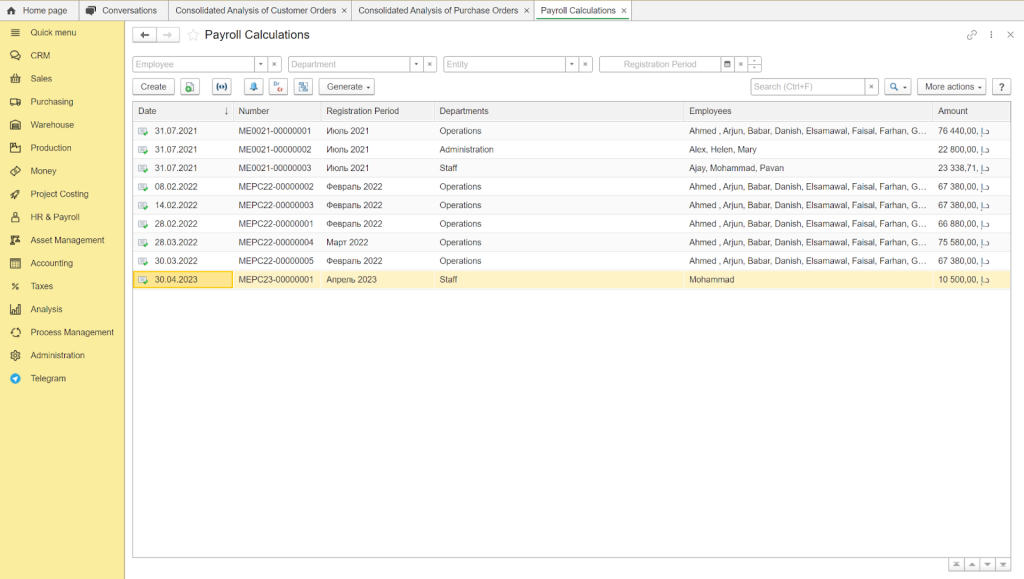
Payroll data and calculations from FirstBit ERP that can be included to support AI-driven cash flow
When this data is available in one ERP environment, AI can help finance teams identify early warning signs. For example, it can highlight projects where costs are rising faster than billing, supplier payments are due before client collections, or delayed approvals may affect future cash inflows.
For UAE contractors, the practical value is better visibility across projects. FirstBit ERP provides the structured data, while AI can use it to detect patterns, forecast pressure points, and support faster decisions on billing, procurement, payments, and project cost control.
Keep every project on budget
Request a demo
Conclusion
AI can help UAE contractors understand cash flow risks earlier, forecast payment gaps more accurately, and act before delays affect project delivery. But before using AI, companies need a reliable system for collecting and updating financial and project data, for example an ERP system.
For contractors, the goal is not to replace financial judgment, but to improve the timing and quality of decisions. When data on contracts, payment terms, actual costs, invoices, procurement, payroll, and project progress is structured and up to date, AI can show where cash pressure may appear and which projects need closer control. This gives finance and project teams more time to adjust payment plans, follow up with clients, control commitments, and protect working capital.
F.A.Q.
How does AI help predict cash flow problems before they happen?
AI analyzes historical payment patterns, project progress, and subcontractor performance from FirstBit modules to forecast liquidity gaps weeks in advance — not after the crisis.
Can AI really prevent late payments from clients?
AI can’t force clients to pay, but it flags high-risk contracts early (e.g., clients with past delays) and suggests protective measures like stricter milestone billing.
Do we need to connect external banking tools to use AI for cash flow?
No, AI works with existing project financial data in FirstBit ERP. Bank integration is optional; accurate forecasting starts with contract and progress data, not bank balances.
Is this useful for small or mid-sized contractors in the UAE?
Yes, even with 3–5 projects, AI can detect cash flow patterns and help avoid the #1 cause of contractor insolvency: cash gaps despite profitable contracts.
Protect your profit margins
Use FirstBit ERP to compare planned vs. actual costs
Request a demo












'%3e%3cg%20clip-path='url(%23clip1_6548_6055)'%3e%3cpath%20d='M13.974%2015.6195C14.2724%2016.0185%2014.6532%2016.3487%2015.0905%2016.5876C15.5278%2016.8265%2016.0114%2016.9686%2016.5084%2017.0042C17.0055%2017.0398%2017.5043%2016.9681%2017.9712%2016.7939C18.4381%2016.6198%2018.8621%2016.3472%2019.2143%2015.9948L21.2994%2013.9098C21.9324%2013.2544%2022.2827%2012.3766%2022.2747%2011.4654C22.2668%2010.5543%2021.9014%209.68269%2021.257%209.03839C20.6127%208.39408%2019.7412%208.02862%2018.83%208.0207C17.9189%208.01278%2017.0411%208.36305%2016.3857%208.99606L15.1902%2010.1845M16.754%2014.2295C16.4555%2013.8305%2016.0747%2013.5003%2015.6374%2013.2614C15.2002%2013.0225%2014.7166%2012.8804%2014.2196%2012.8448C13.7225%2012.8092%2013.2237%2012.8809%2012.7568%2013.0551C12.2899%2013.2292%2011.8659%2013.5018%2011.5136%2013.8542L9.42861%2015.9392C8.7956%2016.5946%208.44534%2017.4724%208.45326%2018.3836C8.46117%2019.2947%208.82664%2020.1663%209.47094%2020.8106C10.1152%2021.4549%2010.9868%2021.8204%2011.898%2021.8283C12.8091%2021.8362%2013.6869%2021.4859%2014.3423%2020.8529L15.5308%2019.6645'%20stroke='%235F7896'%20stroke-width='1.39002'%20stroke-linecap='round'%20stroke-linejoin='round'/%3e%3c/g%3e%3c/g%3e%3crect%20x='0.438953'%20y='0.438953'%20width='28.9709'%20height='28.9709'%20rx='14.4855'%20stroke='%235F7896'%20stroke-width='0.877907'/%3e%3cdefs%3e%3cclipPath%20id='clip0_6548_6055'%3e%3crect%20width='29.8488'%20height='29.8488'%20rx='14.9244'%20fill='white'/%3e%3c/clipPath%3e%3cclipPath%20id='clip1_6548_6055'%3e%3crect%20width='16.6802'%20height='16.6802'%20fill='white'%20transform='translate(7.02344%206.58435)'/%3e%3c/clipPath%3e%3c/defs%3e%3c/svg%3e)