





Top 5 ERP Systems for the Construction Industry in 2026
01 Feb 2026 • 13 min read

Umme Aimon Shabbir
Editor at First Bit


Many vendors claim to offer the best ERP for construction industry, but only a few are truly designed specifically for contractors. Most are generic platforms with added modules that often fail to support critical workflows such as CVR reporting, WPS compliance, phased billing, job costing, subcontractor retention or real-time project cost control.
This article compares five of the best ERP systems in 2026 based on the factors that matter most to UAE contractors — not marketing claims, but real capabilities in project management, regulatory compliance, and seamless integration between field and office.
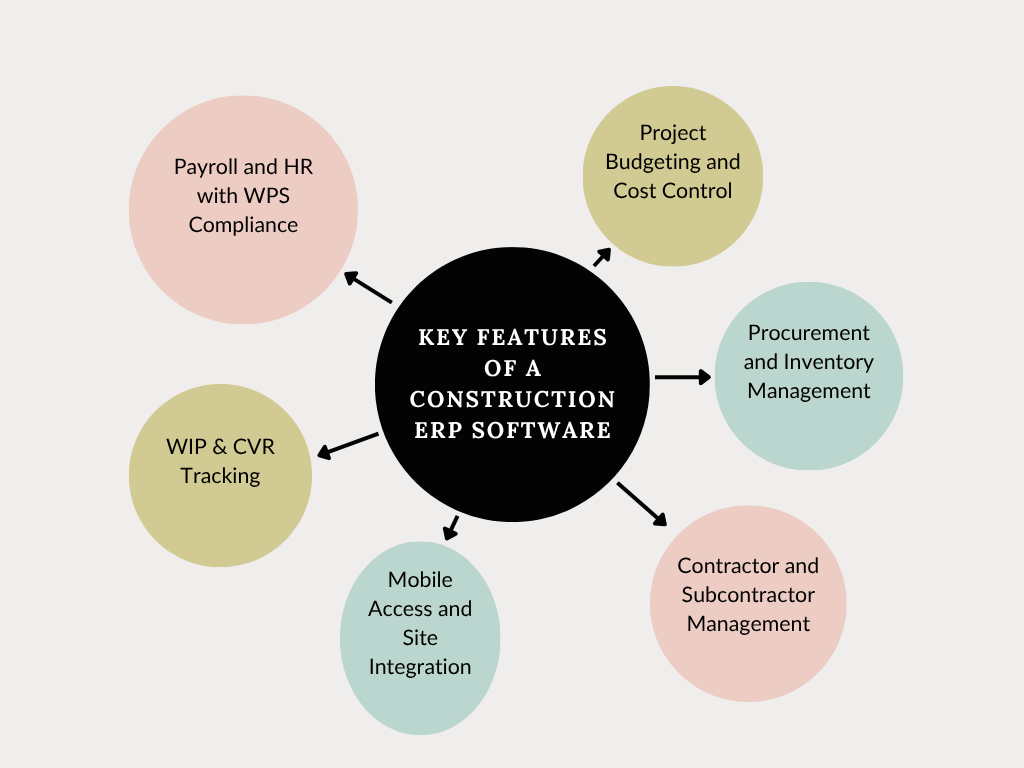
Key Features That a Construction ERP Must Have
A construction ERP system must support complex field operations and integrate finance, procurement, HR, and compliance into a single platform. Below, you'll find the key features that every reliable ERP system should offer.
Why these features are rare outside specialized ERPs:
-
Construction-specific job costing. Most standard ERPs are designed around departments or products, not project-based cost structures with multiple phases, change orders, retainage, and subcontractor costs.
-
Field-to-office integration. Construction ERPs connect site activities, labor hours, equipment usage, and project progress directly to financial and operational records, providing real-time field-to-finance sync — functionality that generic ERP platforms typically do not support out of the box.
-
Complex workforce and compliance management. Features such as certified payroll, union rules, skills tracking, safety documentation, and regulatory compliance are highly industry-specific and uncommon in general ERP solutions.
-
Subcontractor and project coordination. Construction projects involve multiple contractors, suppliers, and temporary teams that require specialized scheduling, approval workflows, and collaboration tools not usually found in standard ERPs.

Project Budgeting and Cost Control
Real-time tracking of planned versus actual costs is an essential feature. A construction ERP should offer granular budget breakdowns by phase and activity, alert project managers to cost overruns, and integrate with procurement to ensure that expenses remain within approved budgets. This helps businesses avoid unplanned expenditures and keep projects financially viable.
Procurement and Inventory Management
The system should streamline the entire procurement cycle, from vendor RFQs and approvals to PO generation, GRNs, and invoice reconciliation. Integrated inventory tracking helps prevent stockouts or double orders, especially for multi-site projects, and also allows for material usage tracking tied to specific cost codes.
Contractor and Subcontractor Management
Managing external vendors is a critical aspect of the industry. An ERP must help track contracts, retention clauses, expiration dates, payment milestones, and compliance requirements, such as safety certifications or insurance. It ensures that vendors are only paid after contractual conditions are met and that non-compliance risks are minimized.
Payroll and HR with WPS Compliance
A modern ERP system should automate time tracking, integrate biometric devices, generate compliant WPS files, and support multiple pay structures. It should also handle employee documentation, leave requests, and gratuity settlements following labor laws, ensuring built-in GCC compliance and audit readiness.
WIP & CVR Tracking
Work-in-progress (WIP) reporting and Cost Value Reconciliation (CVR) are necessary for accurately representing earned value. These tools align financial entries with project progress, helping finance teams forecast profits and detect cost leakage. Systems that lack this alignment often result in inaccurate margin forecasts and delayed financial closings.
Mobile Access and Site Integration
Mobile-ready dashboards ensure field teams can approve budgets, record delivery receipts, or raise RFQs without being tethered to office systems. Mobile ERP access enhances collaboration and reduces delays caused by disconnected workflows. It also improves accuracy by allowing real-time updates directly from the field.
A 2023 Deloitte report found that 83% of construction companies using industry-specific ERP systems reported better financial visibility and faster project execution[?].
FirstBit ERP brings together the tools your construction company needs to manage field operations, finance, procurement, HR, and compliance in one integrated platform. See how its core ERP features help you move away from separate tools and keep project data, costs, resources, and reporting connected across the business.
How to Choose the Best Construction ERP Software

Choosing the right construction ERP isn't just a tech decision; it’s a strategic business choice. Here’s how to make the right call:
1. Define Project-Specific Goals
Start by listing issues you're trying to solve—budget overruns, delayed approvals, manual payroll, poor cost tracking, etc. Each of these pain points should map directly to specific ERP modules or workflows.
2. Map Your Workflows
Review how every operation flows from procurement to billing. Identify disconnects between site teams and finance managers. ERP should fix, not force-fit. The best system adapts to your current process while offering room for process improvement.
3. Involve Field and Finance Teams
Site managers, project engineers, and finance leads should be involved in product demos. Their input ensures the ERP suits day-to-day use. Too often, ERP decisions are made by IT or executives alone, missing the operational nuances of construction teams.
4. Check for Industry-Focused Tools
Choose a system built for construction—tools like CVR, subcontractor billing, milestone tracking, and site reporting must be native, not customized later. Native tools are better integrated and more reliable than bolt-on solutions.
5. Assess Regional Compliance Support
In the UAE and GCC, WPS compliance, VAT readiness, Arabic-English support, and localized payroll formats are non-negotiable. A system that lacks these features will require heavy customization, delaying implementation and increasing costs.
6. Evaluate Scalability and Support
Start small, but ensure your ERP can expand as you grow. Your ERP should allow module-based expansion. Also, local support ensures faster implementation, better training, and a smoother transition across your teams.
According to McKinsey, adopting digital tools like ERP can improve productivity by 15% and reduce costs by up to 6%[?].
Stay one step ahead of competitors
Monitor the UAE market dynamics and adapt fast
Request a demo
Top 5 ERP Systems for the Construction Industry in 2026
Below is a functional comparison of the five best ERP systems commonly used by UAE contractors, based on their native capabilities and excluding add-ons or partner modules.
| ERP System | Best For | Pricing Model |
| FirstBit ERP | Mid-sized contractors in UAE & GCC | Subscription-based |
| Microsoft Dynamics 365 | Multinational and diversified firms | Tiered licensing |
| Sage 300 CRE | Real estate and mid-sized contractors | Modular licensing |
| Oracle Construction Cloud | Large infrastructure enterprises | Custom enterprise |
| Acumatica Construction | Cloud-first SMEs and fast-growing firms | Usage-based pricing |
FirstBit ERP – Built Exclusively for the Construction Industry
FirstBit ERP is purpose-built for construction companies operating in the UAE and GCC. Unlike generic ERPs that require custom modules to support the industry, FirstBit includes construction-specific features out of the box. It integrates field operations with financial control, ensuring better visibility, compliance, and decision-making.
FirstBit ERP’s Key Features
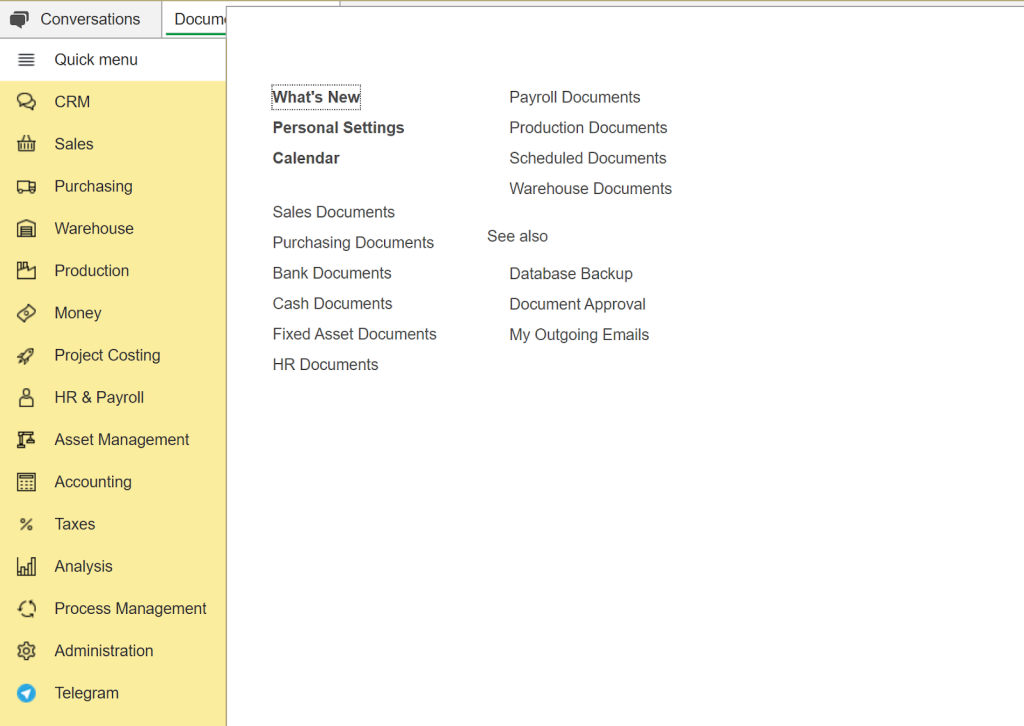
Main menu in FirstBit ERP
-
Real-Time Budget Tracking: FirstBit provides continuous visibility into committed vs. actual costs at every level—phase, task, and material. This helps project managers identify overruns immediately and take corrective action before profits are affected.
-
CVR and WIP Integration: CVR and WIP are built into the finance engine, aligning physical progress with financial projections. This eliminates discrepancies between site reporting and accounting, leading to more accurate forecasting.
-
Procurement Management: The system automates vendor RFQs, PO approvals, GRNs, and invoice matching. Each transaction is linked to the correct cost center, reducing unauthorized spend and manual errors.
-
Subcontractor Oversight: Contract scope, retention clauses, payment milestones, and compliance documents (e.g., insurance, licenses) are all managed in one place. FirstBit tracks expiry dates and automatically blocks payments for non-compliance.
-
WPS-Compliant Payroll & HR: FirstBit generates compliant WPS files and supports payroll structures for multinational teams. It also manages leave, end-of-service benefits, visa documents, and other HR requirements in line with local labor laws.
-
Integrated Document Control: From blueprints to permits, every document is versioned, access-controlled, and stored with project metadata. This helps ensure the right version is used on-site and creates a digital audit trail.
FirstBit ERP’s Benefits
-
Enhanced Profit Margins: Built-in cost monitoring and CVR help companies catch scope creep early. Instead of reacting to overruns after they happen, managers can intervene in real-time.
-
Audit-Ready Financials: E-invoicing, automated VAT reports, payroll ledgers, and compliance documentation ensure readiness for audits and WPS submissions without scrambling at month-end.

FirstBit tax codes for supplies and purchases in the UAE
-
Faster Financial Closings: With real-time posting of costs and automated reconciliation, finance teams spend less time cleaning up data and more time on strategy.
-
Reduction in Rework: Site-to-office syncing ensures that the latest drawings, material requests, and approvals are shared instantly, reducing duplication and project delays.
-
Greater Team Efficiency: With mobile dashboards, site engineers can approve deliveries, raise RFQs, and update progress on the go. This keeps projects moving even when office teams are unavailable.
-
Improved Project Visibility: Equipment & tool tracking helps contractors monitor asset usage, availability, maintenance schedules, and site allocation from a single system. While RFI and submittal tracking allows teams to manage document approvals, revisions, and communication between contractors, consultants or project stakeholders.
According to Autodesk + FMI, poor data and miscommunication cause $88B in annual rework losses in construction. FirstBit ERP solves this with real-time collaboration tools[?].
Microsoft Dynamics 365
Microsoft Dynamics 365 is a robust ERP system suitable for multinational enterprises. While not construction-specific, it offers extensive customization and integration capabilities that large contractors can leverage.
Pros:
-
Highly scalable for global operations with complex organizational structures. Built on Microsoft Azure, Dynamics supports multi-company, multi-language, and multi-currency operations. It’s ideal for enterprises operating across several sectors and countries.
-
Native integration with Office 365, Teams, and Power BI for seamless collaboration and advanced reporting. Dynamics connects with Microsoft tools, enabling smoother reporting and communication. For instance, budget data can be exported to Excel or visualized in Power BI.
-
AI-powered forecasting tools and workflow automation enhance project planning and efficiency. Dynamics includes AI tools that predict cash flow trends, flag overdue invoices, and automate workflows, helping large firms operate efficiently.
Cons:
-
Requires third-party or partner-developed modules to handle construction-specific processes, such as CVR and WIP tracking. Construction features aren’t native, which means extra time and cost to customize or integrate.
-
High licensing and customization costs make it less feasible for mid-sized construction firms. The tiered licensing model and reliance on Microsoft partners make it expensive to scale.
-
Longer implementation timelines can delay operational benefits. Custom setups often take 9–18 months, slowing down time to value.
Sage 300 Construction and Real Estate
Sage 300 CRE, formerly known as Timberline, is a trusted name in North America and has long been a favorite among contractors and property developers for its accounting capabilities.
Pros:
-
Comprehensive job costing and payroll capabilities with detailed audit trails. Sage allows allocation of labor, equipment, and subcontractor costs by phase and activity. Payroll is built for construction and includes certified payroll and union support.
-
Pre-built templates geared toward construction and real estate financial workflows include industry-standard reports, such as job cost summaries, retainage logs, and AIA-style billing forms.
-
Well-established reputation for financial accuracy and compliance. Its track record makes it a reliable choice for firms needing precise cost control.
Cons:
-
The user interface feels outdated and fails to meet modern UX standards. Legacy design slows user adoption and can frustrate teams used to modern cloud tools.
-
Cloud functionality is limited unless paired with an additional product. A desktop-first architecture means limited remote access without extra software.
-
Not ideal for GCC contractors due to a lack of WPS or Arabic language support.t No built-in support for UAE labor rules, Arabic payroll files, or regional VAT compliance.
Oracle Construction and Engineering Cloud
Oracle Construction Cloud is designed for large-scale, multi-phase infrastructure projects. It integrates with Primavera and Aconex, making it ideal for contractors managing mega projects with complex scheduling needs.
Pros:
-
Industry-leading scheduling and project portfolio management tools combine Primavera’s scheduling precision with Oracle’s financial controls.
-
Deep analytics for risk forecasting, resource optimization, and timeline control. Includes built-in analytics dashboards for project health, cash flow, and variance tracking.
-
Scalable architecture is ideal for multinational firms. It supports global deployments and can be tailored to large enterprise needs.
Cons:
-
High cost and implementation complexity; best suited for Tier-1 contractors: Best fit for mega-projects and firms with internal IT and PMO departments.
-
Requires Oracle-certified consultants to configure and deploy. Implementation and support are dependent on specialized teams.
-
Over-engineered for mid-sized firms or single-country contractors: May add unnecessary complexity for firms focused on regional contracting.
Acumatica Construction Edition
Acumatica Construction Edition is a modern, cloud-native ERP solution that suits SMEs looking for flexibility and fast deployment with intuitive interfaces.
Pros:
-
Mobile-first design allows real-time data access from job sites. Users can log hours, track deliveries, and manage approvals from any device.
-
Customizable dashboards and visual analytics improve decision-making. Role-based dashboards give project managers, finance teams, and executives the KPIs they need.
-
Open API architecture facilitates seamless integration with tools like Procore or DocuSign. Companies can connect their tech stack without being locked into proprietary tools.
Cons:
-
Smaller ecosystem of implementation partners compared to larger vendors. Fewer regional partners mean longer onboarding or limited local support.
-
Requires localization for regional compliance, including WPS and VAT. Needs manual setup or partner-developed solutions to meet GCC standards.
-
Native construction features are fewer compared to specialized ERPs like FirstBit. Basic job costing is included, but CVR, WIP, and subcontractor tools require customization.
What Makes a Construction ERP Truly Specialized?
The key differentiator isn’t the number of features — it’s whether those features are built into the core system or added later through customizations and third-party modules. The latter can make implementations more expensive and difficult to maintain over time.
That’s why the most effective construction ERPs are not adapted from generic business software — they are purpose-built for the construction industry.
For UAE contractors, this specialization means:
-
Native CVR and WIP management integrated directly within project accounting, enabling accurate revenue recognition, cost forecasting, and real-time visibility into project profitability.
-
Built-in UAE compliance capabilities including e-invoicing, WPS-complient certified payroll, VAT regulations, and Arabic-language workflows, reducing implementation complexity and ongoing customization costs.
-
A unified data model that integrates field operations, project management, procurement, payroll, equipment, and finance into a single source of truth.
-
Construction-specific workflows for subcontract management, change orders, progress billing, retention tracking, and project cost control.
-
Real-time visibility across projects that allows stakeholders to monitor budgets, commitments, productivity, cash flow, and margins without relying on spreadsheets or disconnected systems.
Only systems designed specifically for construction from day one can deliver this level of operational alignment, financial control, and project visibility. Rather than forcing contractors to adapt their processes to the software, a specialized construction ERP is built around the way construction businesses actually operate.
Free up your time with FirstBit ERP
Request a demo
Final Thoughts
Choosing an ERP system for your construction company is a major decision, one that can impact operational efficiency, financial visibility, and your ability to grow in a competitive market. As the industry evolves with tighter regulations and increased client expectations, businesses need more than a generic system. They need a solution that understands the intricacies of construction workflows and local compliance.
Each of the ERP systems reviewed here brings value to specific types of construction firms. Still, FirstBit ERP distinguishes itself by offering an end-to-end solution tailored to the needs of contractors in the UAE and GCC. Its combination of industry-specific functionality, compliance readiness, local support, and scalability makes it a compelling choice for companies looking to streamline operations without sacrificing flexibility.
FAQ
Is FirstBit ERP better than Sage or Dynamics for UAE contractors?
Can a general ERP handle construction accounting properly?
Why do some contractors regret their ERP choice after 12 months?
Does FirstBit ERP require extensive customization like other ERPs?
How does FirstBit compare on mobile access for site teams?
What is the best ERP system for construction?
What is the best ERP system for Dubai construction projects in 2026?
Make the most out of your project data
Analyze results with FirstBit’s real-time dashboards
Request a demo

Umme Aimon Shabbir
Editor at First Bit
Share this article
'%3e%3cg%20clip-path='url(%23clip1_6548_6055)'%3e%3cpath%20d='M13.974%2015.6195C14.2724%2016.0185%2014.6532%2016.3487%2015.0905%2016.5876C15.5278%2016.8265%2016.0114%2016.9686%2016.5084%2017.0042C17.0055%2017.0398%2017.5043%2016.9681%2017.9712%2016.7939C18.4381%2016.6198%2018.8621%2016.3472%2019.2143%2015.9948L21.2994%2013.9098C21.9324%2013.2544%2022.2827%2012.3766%2022.2747%2011.4654C22.2668%2010.5543%2021.9014%209.68269%2021.257%209.03839C20.6127%208.39408%2019.7412%208.02862%2018.83%208.0207C17.9189%208.01278%2017.0411%208.36305%2016.3857%208.99606L15.1902%2010.1845M16.754%2014.2295C16.4555%2013.8305%2016.0747%2013.5003%2015.6374%2013.2614C15.2002%2013.0225%2014.7166%2012.8804%2014.2196%2012.8448C13.7225%2012.8092%2013.2237%2012.8809%2012.7568%2013.0551C12.2899%2013.2292%2011.8659%2013.5018%2011.5136%2013.8542L9.42861%2015.9392C8.7956%2016.5946%208.44534%2017.4724%208.45326%2018.3836C8.46117%2019.2947%208.82664%2020.1663%209.47094%2020.8106C10.1152%2021.4549%2010.9868%2021.8204%2011.898%2021.8283C12.8091%2021.8362%2013.6869%2021.4859%2014.3423%2020.8529L15.5308%2019.6645'%20stroke='%235F7896'%20stroke-width='1.39002'%20stroke-linecap='round'%20stroke-linejoin='round'/%3e%3c/g%3e%3c/g%3e%3crect%20x='0.438953'%20y='0.438953'%20width='28.9709'%20height='28.9709'%20rx='14.4855'%20stroke='%235F7896'%20stroke-width='0.877907'/%3e%3cdefs%3e%3cclipPath%20id='clip0_6548_6055'%3e%3crect%20width='29.8488'%20height='29.8488'%20rx='14.9244'%20fill='white'/%3e%3c/clipPath%3e%3cclipPath%20id='clip1_6548_6055'%3e%3crect%20width='16.6802'%20height='16.6802'%20fill='white'%20transform='translate(7.02344%206.58435)'/%3e%3c/clipPath%3e%3c/defs%3e%3c/svg%3e)


Related articles


See all








See FirstBit ERP solutions in action
Discover how our system solves the unique challenges of contractors in a personalized demo.
After the demo you will get a quotation for your company.
After the demo you will get a quotation for your company.