





How to Prevent Construction Project Overruns and Protect Your Budget
Publication date 19 Aug 2026 •
Updated 18 Sep 2026 •
9 min read

Anna Fischer
Construction Content Writer


A budget is approved, mobilization begins, and the first months look controlled. By mid-project, materials sit outside planned cost lines, work has proceeded on undocumented changes, and margin is disappearing. The loss rarely comes from one decision. It grows through commitments no one stopped.
To prevent overruns, control spending before a requisition, order, variation, or subcontract instruction is approved. A connected construction project cost control process gives project, procurement, and finance teams one view of planned, committed, received, and actual costs. These controls stop leakage before it becomes a budget overrun.
How can a contractor stop project managers from exceeding approved budgets?
A contractor controls spending through commitments, not reports after the fact. Before a project manager approves a request, the remaining balance for its cost code must be visible. If the request exceeds its baseline or an authorization limit, the workflow must route it upward instead of allowing a bypass.
- Lock the baseline by BOQ or WBS line, cost code, phase, and owner before mobilization.
- Check every requisition and commitment against the available balance before approval.
- Apply approval limits by value and expense type, with exceptions recorded in the workflow.
- Show budget, committed cost, actual cost, and forecast to completion in one view.
- Record each variation’s effect on scope, schedule, cost, and cash flow before work starts.
- Hold a weekly review focused on variances, contingencies, and corrective actions.
- Assign every cost code to a named owner responsible for deviations.
Controls work only with current data. A late month-end report describes the past. Managers need requisitions, orders, subcontract commitments, warehouse issues, labor, invoices, and variations in one cost view.
ERP systems can provide this level of control by connecting the approved budget with commitments and actual project transactions as they move through approval and execution. FirstBit ERP also provides project cost analysis within the same control environment, allowing teams to compare estimated and actual quantities and costs, review variances, and drill down by project task and expense category.

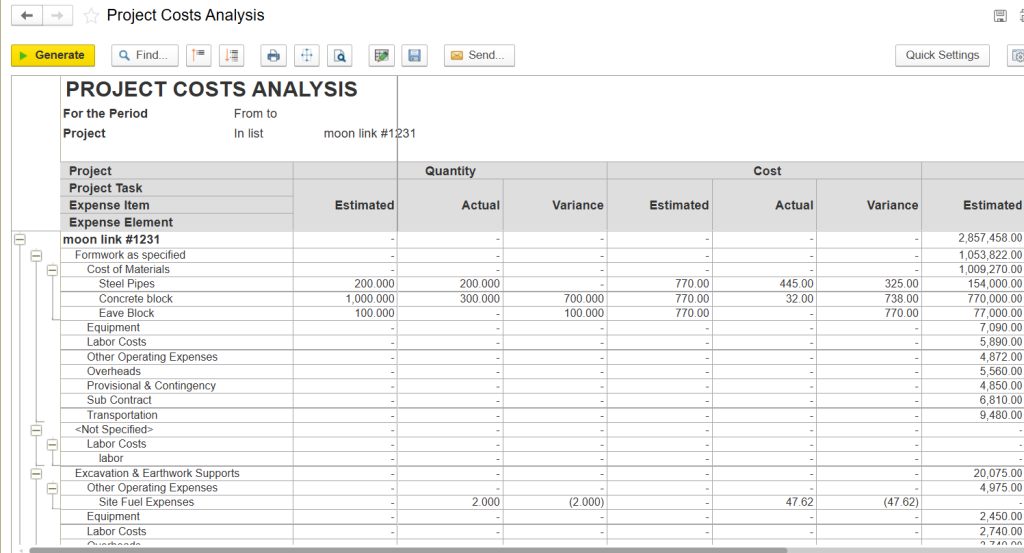
Project cost analysis in FirstBit ERP, with estimated, actual, and variance figures by project task and expense category
How can procurement managers prevent buying materials outside the approved project budget?
Procurement managers stop off-budget buying when every purchase starts with an authorized requisition linked to a project, BOQ or WBS line, and cost code. The balance is checked before a purchase order is issued. An insufficient balance is blocked or sent to a higher approver, with the exception recorded.
- Require a requisition for every material, service, rental, and subcontract purchase.
- Validate quantity and value against the relevant budget line before ordering.
- Separate requesting, approving, ordering, receiving, and payment duties.
- Use the purchase order as the only standard authorization sent to a supplier.
- Ban unapproved site cash purchases or use a documented emergency procedure.
- Record delivery through a goods receipt note and update inventory immediately.
- Complete three-way matching of the order, receipt, and invoice before payment.
- Use approved suppliers, compare quotations, and document the selection.
- Consolidate similar needs and track long-lead items to reduce rush orders.
A requisition provides internal authority before an external order; three-way matching verifies that finance pays for what was approved and received. Together, they create a traceable chain from demand to payment.
Procurement also needs stock visibility across warehouses and sites. Otherwise, one team may buy supplies already held elsewhere. Connecting requisitions, deliveries, inventory, and finance makes purchasing transparent.
Construction ERP systems can provide this connection by keeping project demand, purchasing commitments, goods receipts, and available inventory within the same workflow. This allows procurement teams to check not only whether a request fits the project budget, but also whether the required materials are already available or committed elsewhere.
FirstBit ERP supports this type of purchasing workflow by connecting requisitions, purchase orders, approvals, warehouse transactions, and project cost data within one system.
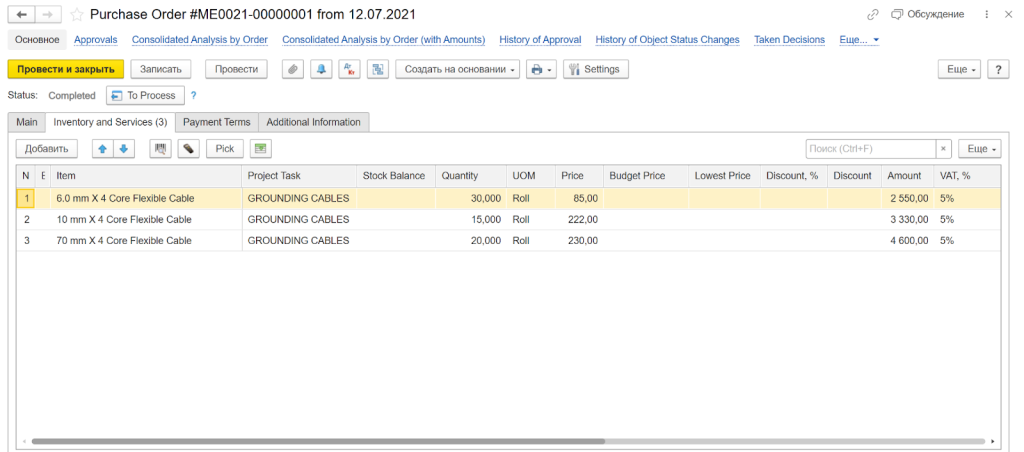
Purchase order linked to project tasks, stock balances, pricing, and approvals in FirstBit ERP
Prevent cost overruns
Register expenses in FirstBit ERP
Request a demo
Why do construction projects exceed their budgets?
Budget overruns usually combine weak estimates, unclear scope, inadequate pre-planning, and late cost data. Initial estimations may use optimistic labor productivity, outdated prices, incomplete designs, or missing indirect costs. A rushed front end creates risk from day one.
During execution, fragmented spreadsheets hide change orders, rework, delayed design decisions, subcontractor claims, and poor cost allocation. Inadequate training adds another gap because a policy cannot work when site staff do not know the correct approval or escalation process.
These causes are manageable. Estimates should be documented, realistic, and updated with actual data and authorized changes. Scope additions need a defined process so cost and timelines do not move without approval.
Practical checklist: preventing overruns on every project
Use this checklist before mobilization and throughout execution:
- Approve, break down, and lock the detailed budget by cost code.
- Link every requisition to the correct project and BOQ or WBS line.
- Check the available balance before issuing each purchase order.
- Document approval limits and apply them without informal exceptions.
- Display committed cost beside actual cost and the baseline.
- Price and approve every variation before related work begins.
- Monitor material prices and secure critical long-lead items early.
- Vet subcontractors and align their terms with the main contract.
- Review costs weekly and update the completion forecast monthly.
- Train site and office teams on workflows, forms, and escalation.
The checklist works only as a routine practice. Management should test transactions, confirm approval sequence, review overdue actions, and correct repeated bypasses. A control used only before an audit is not an effective system.
Keep every project on budget
Request a demo
How to protect the budget from external cost drivers
A firm cannot control every market movement, but it can limit exposure through planning and contract terms. Monitor material prices, prepare long-lead procurement early, and fix prices where the terms and storage plan make sense. Framework agreements and vendor relationships improve visibility over availability and lead times.
For imports, identify the currency of each commitment and review payment timing. Longer or volatile contracts may need re-negotiating supplier terms or clear escalation clauses. Contract guidance distinguishes fixed prices from defined adjustments for major components such as labor and materials.
Document each instruction, design revision, site condition, and delay event with its cost, schedule effect, notice, and approval status. This evidence supports change management and protects the contractor’s commercial position.
How FirstBit ERP helps protect the approved budget
FirstBit ERP connects project management, cost control, procurement, warehouse, accounting, and reporting for construction and contracting businesses in the UAE. Teams can structure estimates and budgets by BOQ or WBS and track project progress against the same project structure, including estimated quantities, reported work, and completion percentages.
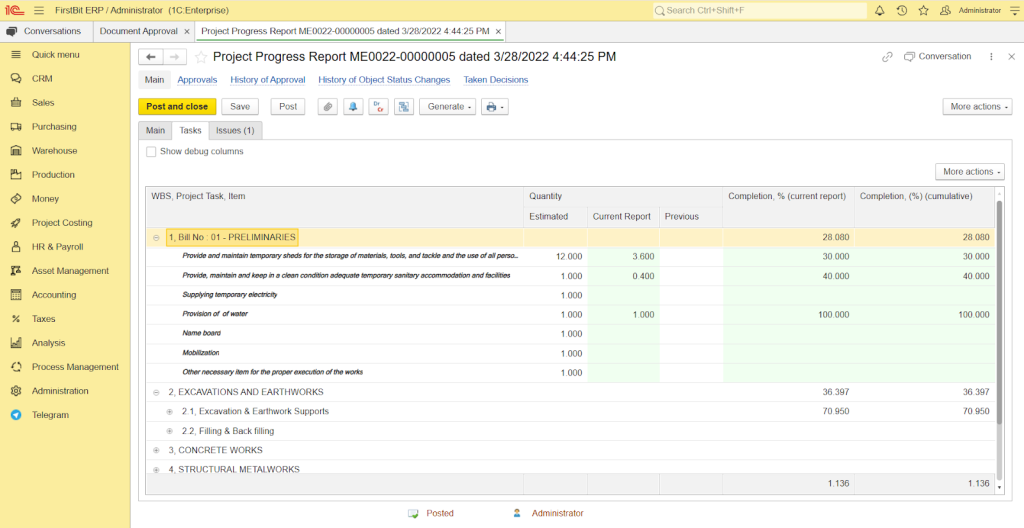
Project progress tracking by BOQ and WBS lines in FirstBit ERP
Requisitions link demand to the project structure and remaining budget. Purchase orders follow approval workflows, supplier offers can be compared in a centralized platform, and deliveries and inventory remain visible. If a request exceeds available quantity or value, the system blocks, flags, or routes the exception. Three-way matching connects the order, goods receipt, and supplier invoice before payment approval.
This view helps teams act before commitments become actual costs and keeps open obligations beside posted transactions.
Protect your profit margins
Use FirstBit ERP to compare planned vs. actual costs
Request a demo
FAQ
How can a contractor stop project managers from exceeding approved budgets?
How can procurement managers prevent buying materials outside the approved project budget?
What is the difference between actual cost and committed cost?
How often should project budgets be reviewed?
Who should approve a variation?
Conclusion: budget control is a habit, not a report
Cost overruns are prevented by decisions made before spending is committed. When each request is checked against the balance, each variation is priced before execution, and commitments are visible beside actuals, the business sees risk while it can still act.
Together, these controls give project and procurement teams the same view and help prevent construction project overruns. Explore how FirstBit ERP Constructor can support your specific business needs and protect your budget.
Manage your cash flow with confidence
Request a demo

Anna Fischer
Construction Content Writer
Share this article
'%3e%3cg%20clip-path='url(%23clip1_6548_6055)'%3e%3cpath%20d='M13.974%2015.6195C14.2724%2016.0185%2014.6532%2016.3487%2015.0905%2016.5876C15.5278%2016.8265%2016.0114%2016.9686%2016.5084%2017.0042C17.0055%2017.0398%2017.5043%2016.9681%2017.9712%2016.7939C18.4381%2016.6198%2018.8621%2016.3472%2019.2143%2015.9948L21.2994%2013.9098C21.9324%2013.2544%2022.2827%2012.3766%2022.2747%2011.4654C22.2668%2010.5543%2021.9014%209.68269%2021.257%209.03839C20.6127%208.39408%2019.7412%208.02862%2018.83%208.0207C17.9189%208.01278%2017.0411%208.36305%2016.3857%208.99606L15.1902%2010.1845M16.754%2014.2295C16.4555%2013.8305%2016.0747%2013.5003%2015.6374%2013.2614C15.2002%2013.0225%2014.7166%2012.8804%2014.2196%2012.8448C13.7225%2012.8092%2013.2237%2012.8809%2012.7568%2013.0551C12.2899%2013.2292%2011.8659%2013.5018%2011.5136%2013.8542L9.42861%2015.9392C8.7956%2016.5946%208.44534%2017.4724%208.45326%2018.3836C8.46117%2019.2947%208.82664%2020.1663%209.47094%2020.8106C10.1152%2021.4549%2010.9868%2021.8204%2011.898%2021.8283C12.8091%2021.8362%2013.6869%2021.4859%2014.3423%2020.8529L15.5308%2019.6645'%20stroke='%235F7896'%20stroke-width='1.39002'%20stroke-linecap='round'%20stroke-linejoin='round'/%3e%3c/g%3e%3c/g%3e%3crect%20x='0.438953'%20y='0.438953'%20width='28.9709'%20height='28.9709'%20rx='14.4855'%20stroke='%235F7896'%20stroke-width='0.877907'/%3e%3cdefs%3e%3cclipPath%20id='clip0_6548_6055'%3e%3crect%20width='29.8488'%20height='29.8488'%20rx='14.9244'%20fill='white'/%3e%3c/clipPath%3e%3cclipPath%20id='clip1_6548_6055'%3e%3crect%20width='16.6802'%20height='16.6802'%20fill='white'%20transform='translate(7.02344%206.58435)'/%3e%3c/clipPath%3e%3c/defs%3e%3c/svg%3e)


Related articles


See all








See FirstBit ERP solutions in action
Discover how our system solves the unique challenges of contractors in a personalized demo.
After the demo you will get a quotation for your company.
After the demo you will get a quotation for your company.